
유데미 웹개발 부트캠프 섹션 11

Section 11 요약:

아래처럼 윈도우 크기 작을 땐 default 설정해서
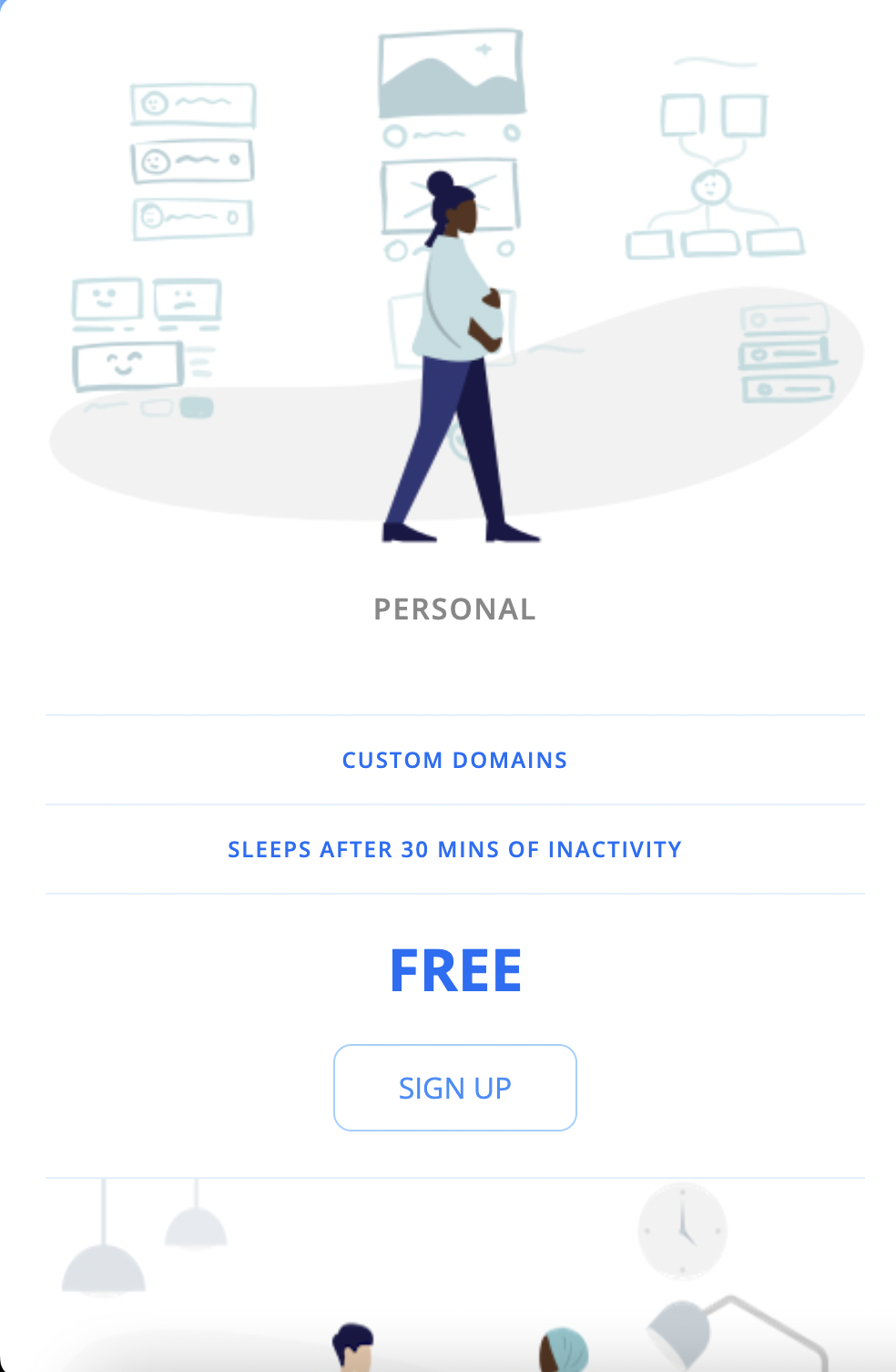
default는 column으로 작업한다.


커지면 아래처럼 가로로 나오게 만들기를 했습니다.

반응형 웹사이트 css 연습

아래는 사용한 css 코드입니다.

html {
    font-family: 'Open Sans', sans-serif;
    box-sizing: border-box;
}

body {
    background-color: #60a9ff;
    display: flex;
    justify-content: center;
    align-items: center;
    min-height: 100vh;
}

.panel {
    background-color: white;
    border-radius: 10px;
    padding: 15px 25px;
    width: 100%;
    max-width: 960px;
    display: flex;
    flex-direction: column;
    text-align: center;
    text-transform: uppercase;
}

.pricing-plan {
    border-bottom: 1px solid #e1f1ff;
}

.pricing-plan:last-child {
    border-bottom: none;
}

.pricing-img {
    margin-bottom: 25px;
    width: 100%;
    max-width: 100%;

}

.pricing-header {
    color: #888;
    font-weight: 600;
    letter-spacing: 1px;
}

.pricing-features {
    margin: 50px 0 25px;
    color: #016ff9;
}

.pricing-features-item {
    font-weight: 600;
    letter-spacing: 1px;
    font-size: 12px;
    line-height: 1.5;
    padding: 15px 0;
    border-top: 1px solid #e1f1ff;
}

.pricing-features-item:last-child {
    border-bottom: 1px solid #e1f1ff;
}

.pricing-price {
    color: #016ff9;
    display: block;
    font-size: 32px;
    font-weight: 700;
}

.pricing-button {
    border: 1px solid #9dd1ff;
    border-radius: 10px;
    color: #348efe;
    display: inline-block;
    padding: 15px 35px;
    text-decoration: none;
    margin: 25px 0;
    transition: background-color 200ms ease-in-out;

}

.pricing-button:hover,
.pricing-button:focus {
    background-color: #e1f1ff;
}

.pricing-button.is-featured {
    background-color: #48aaff;
    color: white;
}

.pricing-button.is-featured :hover,
.pricing-button.is-featured:focus {
    background-color: #269aff;
    color: white;
}

@media (min-width: 900px) {
    .panel {
        flex-direction: row;

    }

    .pricing-plan {
        border-bottom: none;
        border-right: 1px solid #e1f1ff;
        padding: 24px 50px;
    }

    .pricing-plan:last-child {
        border-right: none;
    }
}
유데미 웹개발 부트캠프 섹션 6~10

Colt Steele의 The web developer bootcamp Section 6 부터는 css에 대한 강의입니다. 그래도 한 번 다른 강의 (스파르타 학원 웹개발 종합반 강의) 들었다고 아는 단어가 몇 개 들립니다. 섹션 하나 당 1시간에서 2시간 걸리는데 코드 따라치고 퀴즈도 풀다보면 거의 한 섹션당 5시간은 잡고 듣는 것 같습니다. 심지어 좀 아는 부분이라고 생각되는데도 그렇습니다. 유데미 웹개발자부트캠프 강의는 섹션 61까지 있습니다. 


원래 11월 7일 전까지 유데미 웹개발자부트캠프 강의를 다 들을려고 했는데 더 분발해야겠습니다. 대학생인 동생이 당분간 시험기간이라 새벽까지 공부한다고 하니 같이 조인해볼 예정입니다. 전체 강의의 앞부분은 프론트엔드의 역할에 대한 것들이라 얼른 백엔드 파트도 배우고 싶습니다. 


Sololearn 이라는 모바일 학습앱으로 이동하거나 생각날 때마다 JavaScript를 배우고 있는데 꽤 도움이 됩니다. Lesson이 59개로 나누어져 있는데 이제 27개 했습니다. 다음주 안으로 JavaScript를 마치고 Java로 넘어갈 예정입니다.


웹개발 종합반에서 Java와 JavaScript의 차이는 인도와 인도네시아라고 했습니다.


관련이 없단 얘기죠. 


CSS: Cascading Style Sheets | MDN

Cascading Style Sheets (CSS) is a stylesheet language used to describe the presentation of a document written in HTML or XML (including XML dialects such as SVG, MathML or XHTML). CSS describes how elements should be rendered on screen, on paper, in speech

developer.mozilla.org


CSS 연결하기

  • <link rel="stylesheet" href="app.css">
  • <head>사이에 넣는다</head>


Color

  • 이름있는 색깔 140개 있음
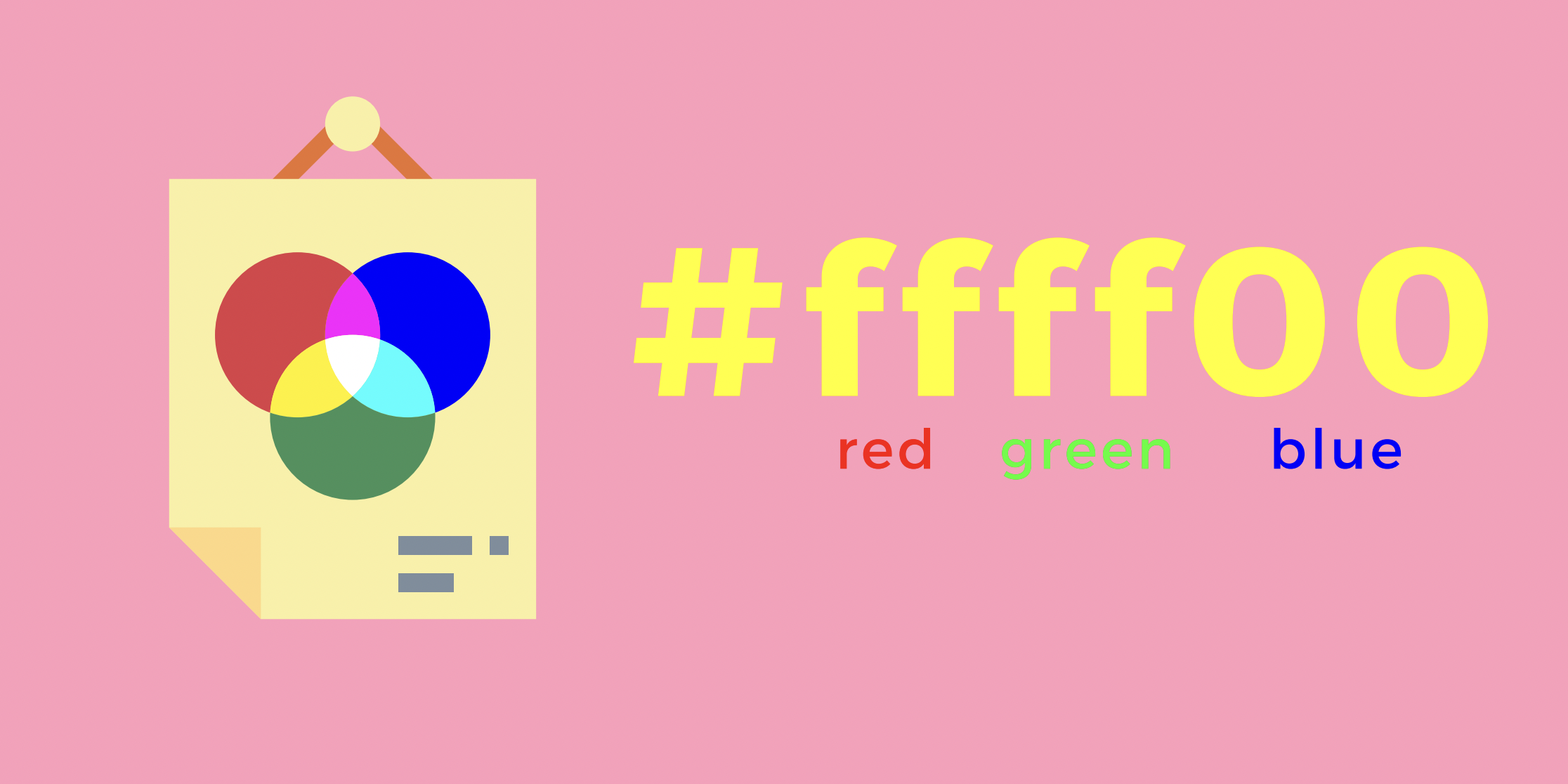
  • rgb (red, green, blue)
  • hex 

hexadecimal color code


Color Names — HTML Color Codes

HTML color names rule. Modern browsers support 140 HTML color names which we've listed here along with their Hex color codes and RGB values.

htmlcolorcodes.com


Color Picker — HTML Color Codes

Finding that perfect color is easier than you think. Use our color picker to discover beautiful colors and harmonies with Hex color codes and RGB values.

htmlcolorcodes.com


CSS Text Properties

  • text-align
  • font-weight: normal(400), bold(700), lighter, bolder, 100, 900
  • text-decoration: underline, underline dotted, overline, line-through, wavy, dashed, solid, none
  • line-height (줄간격)
  • letter-spacing (글자간격)
  • text-transfer: uppercase, lowercase, capitalize

font-size

  • font-size: 대부분 px(픽셀)을 사용함; 기기마다 환경에 따라 1 px가 다름

font-family


CSS Font Stack: Web Safe and Web Font Family with HTML and CSS code.

Join to access discussion forums and premium features of the site.

www.cssfontstack.com

  • font-family: 폰트명;


CSS Selectors

  • universal selector: * {  } 전체 다 지정
  • element selector: 해당 element 다 지정함; eg. img { }, button{ }
  • selector list: 여러개 같이 지정; eg. h1, h2 { }
  • descendent selector: body button { } -> body에 있는 모든 버튼을 지정
  • adjacent selector: h1 + p {} -> h1 바로 다음에 오는 p를 지정
  • direct child: > 사용해서 그룹 안에 요소 지정

ID selector

  • #아이디 { }
  • 한 번만 사용함

Class selector

  • 그룹으로 묶어서 사용
  • .클래스이름 { }

Attribute selector

  • 레이블된 "타입"을 모두 지정
  • input [type="text"] {   } -> input 안에 "text"를 지정함


Trending Color Palettes - Coolors

Get inspired by thousands of beautiful color schemes and make something cool!

coolors.co


Pseudo classes

  • keyword added to a selector that specifies a special state of the selected element(s)
  • :active -> 누르면 변하게
  • :checked -> 체크하면 변하게
  • :first
  • :first-child
  • :hover -> 마우스 올라가면 변하게
  • :not()
  • :nth-child()
  • :nth-of-type() -> n번째 타입이 변하게; 홀수 (2n-1) 짝수 (2n)


Pseudo elements

  • Keyword added to a selector that lets you style a particular part of selected element(s)
  • : 원래는 두개 써야하지만 크롬에서는 한개 써도 됨
  • ::after
  • ::before
  • ::first-letter
  • ::first-line
  • ::selection


The Cascade

  • 순서가 중요함 (The order your styles are declared in and linked to matters!) 마지막에 한 걸로 됨
  • Specificity:  ID > CLASS > ELEMENT (더 구체적인 게 이김)
  • https://specificity.keegan.st/
 

Specificity Calculator

Specificity Calculator A visual way to understand CSS specificity. Change the selectors or paste in your own.

specificity.keegan.st


Inline Styles

  • 거의 아무도 안씀
  • 비효율적

!important

  • 다른 것들을 다 이기는 스타일이다! Specificity 다 이김
  • 잘안씀

CSS Inheritance

  • 상위 개체의 스타일 그대로 받아옴


Border 

  • border-width (두께) 랑 border-style (solid, dashed, dotted, inset)같이 해야 보임
  • width style color 순을 써도 됨
  • border: 2px solid red;


Padding, Margin

  • padding: 박스 안 들여쓰기
  • margin: 박스 간격 띄우기


Display properties

  • display: inline, block, inline-block, none


CSS Units

  • px: 가장 많이 사용되는 단위; 반응형에는 권장하지 않음
  • %: 상대적인 비율 
  • em: With font-size, 1em equals the font-size of the parent. 2em's is twice the fontsize of the parent, etc. EM'S ARE RELATIVE UNITS With other properties, 1em is equal to the computed font-size of the element itself. 
    • 바로 위에 parents를 기준으로 함
  • rem: Relative to the root html element's font-size. Often easier to work with. ROOT EMS If the root font-size is 20px, 1 rem is always 20px, 2rem is always 40px, etc.
    • 최초 root element를 기준으로 함
  • vh : viewheight: 1vh is 1% of the height of the viewport
  • vw: viewwidth: 1vw is 1% of the width of the viewport


Opacity & Alpha Channel

  • Alpha Channel: rbga(red, blue, green, alpha) -> 색깔만 투명해짐
    • hex 는 00 to FF
    • rbg 는 0 to 1
  • opacity -> 전체적으로 (포함된 elements 다) 투명해짐


Position Property

  • https://developer.mozilla.org/en-US/docs/Web/CSS/position
  • static: 다른 스타일 설정해도 효과 없는 상태임 (default 상태를 유지함)
  • relative: 기존 default position 대비 움직이고 다른 element에는 영향 없음
  • absolute: The element is removed from the normal document flow, and no space is created for the element in the page layout. It is positioned relative to its closest positioned ancestor, if any; otherwise, it is placed relative to the initial containing block. Its final position is determined by the values of top, right, bottom, and left.
  • fixed: 항상 고정되어 있음. The element is removed from the normal document flow, and no space is created for the element in the page layout. It is positioned relative to the initial containing block established by theviewport, except when one of its ancestors has atransform,perspective, orfilterproperty set to something other thannone(see theCSS Transforms Spec), or thewill-changeproperty is set totransform, in which case that ancestor behaves as the containing block. (Note that there are browser inconsistencies withperspectiveandfiltercontributing to containing block formation.) Its final position is determined by the values oftop,right,bottom, and left.
 

position - CSS: Cascading Style Sheets | MDN

The position CSS property sets how an element is positioned in a document. The top, right, bottom, and left properties determine the final location of positioned elements.

developer.mozilla.org


CSS Transitions


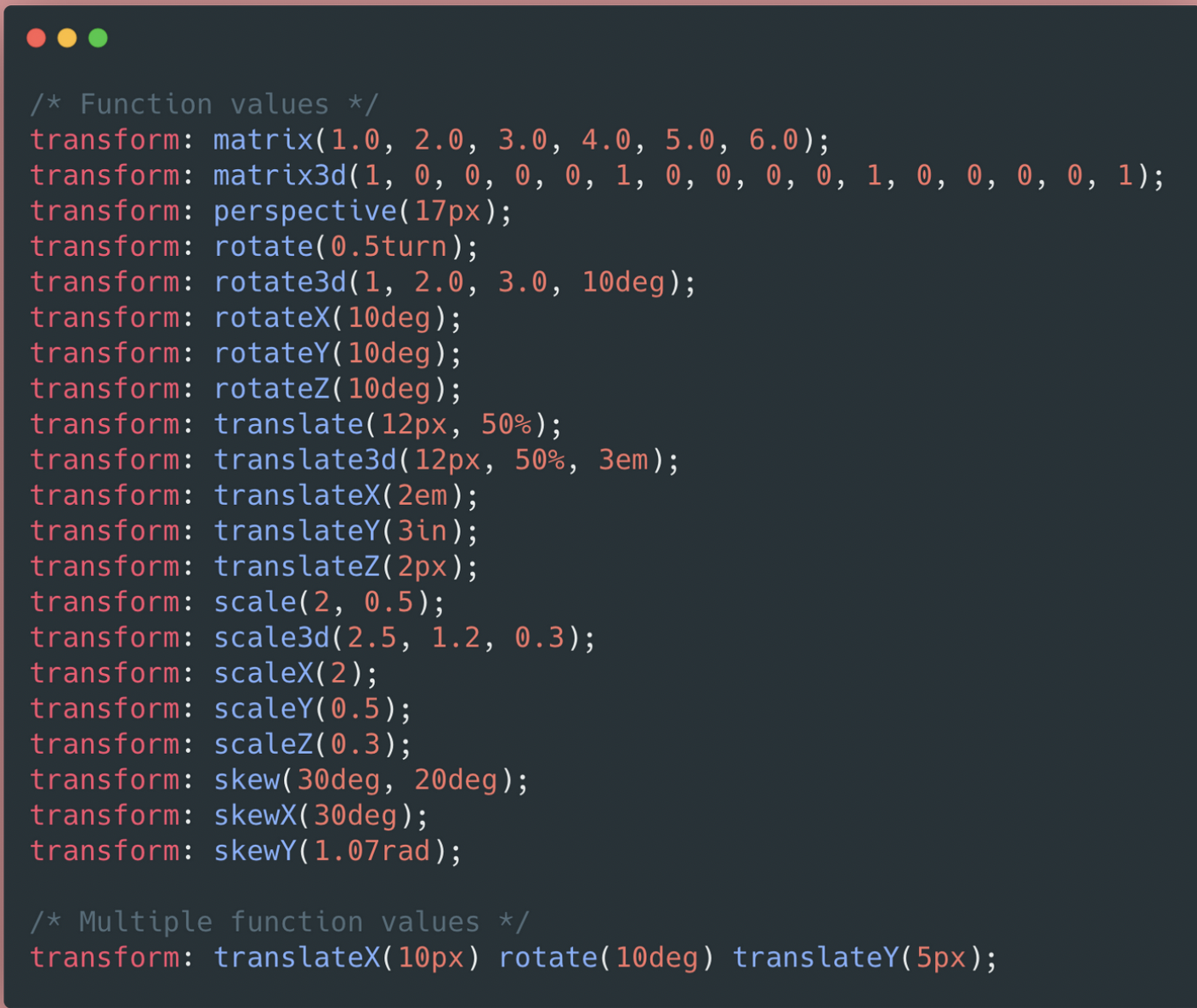
CSS Transforms

css transform


2회차에서는 노트 필기를 좀 하면서 개념정리를 하려고 합니다.

1회차에서는 복붙하면서 따라가기에 급급했다면 2회차에는 정리를 할 수 있는 여유가 생겼습니다.

배운 것들을 tistory 블로그에도 적용하면서 써보도록 하겠습니다. 

css

Cascading Style Sheet

  • background-color: green;
  • width: 300px;
  • height: 200px;
  • color: white;
  • text-align: center;
  • background-image: url("");
  • background-position: center;
  • background-size: cover;
  • border-radius: 10px; 
  • padding (들여쓰기)
  • padding-top: 40px;
  • margin (여백)
  • margin: auto; (상하좌우 최대한 밀기)


구글 폰트 가져오기

  • https://fonts.google.com/?subset=korean
  • font 고르기 -> select this style -> 세번째 링크 복사 -> <title> 밑에 붙여넣기
  • CSS rules to specify families 복사 -> <style> 밑에 *{붙여넣기}

주석 달기

  • command + /
  • 1) 필요없어진 코드를 삭제하는 대신 임시로 작동하지 못하게 하고 싶을 때
  • 2) 코드에 대한 간단한 설명을 붙여두고 싶을 때 사용합니다.
  • 주석을 붙여놓으면, 브라우저/컴퓨터가 읽지 않아요.
  • 즉, 개발자 본인 또는 동료를 위해 붙여두는 것!

부트스트랩 (css 꾸러미)


가운데로 위치하기

display: flex;
flex-direction: column;
justify-content: center;
align-items: center;

마우스 올렸을 때 스타일 변경 hover

.mytitle > button:hover {
  border: 2px solid white;
}


이미지 어둡게 하기

background-image: linear-gradient(0deg, rgba(0, 0, 0, 0.5), rgba(0, 0, 0, 0.5)), url("이미지url넣기")

JavaScript

  • 프로그래밍 언어 중 하나로, 브라우저가 알아들을 수 있는 언어
  • <script></script>
  • 검사 -> Console 
  • let 으로 변수를 선언
  • .push. -> 추가
  • .length -> 리스트의 길이 구하기
  • '나눗셈의나머지'를 구하고 싶은 경우 let a = 20 let b = 7 a % b = 6
  • .split('나누는기준문자') -> 특정문자로 문자열 나누기


1주차 숙제

<!doctype html>
<html lang="en">

<head>
<meta charset="utf-8">
<meta name="viewport" content="width=device-width, initial-scale=1, shrink-to-fit=no">

<link href="https://cdn.jsdelivr.net/npm/bootstrap@5.0.2/dist/css/bootstrap.min.css" rel="stylesheet"
integrity="sha384-EVSTQN3/azprG1Anm3QDgpJLIm9Nao0Yz1ztcQTwFspd3yD65VohhpuuCOmLASjC" crossorigin="anonymous">
<script src="https://ajax.googleapis.com/ajax/libs/jquery/3.5.1/jquery.min.js"></script>
<script src="https://cdn.jsdelivr.net/npm/bootstrap@5.0.2/dist/js/bootstrap.bundle.min.js"
integrity="sha384-MrcW6ZMFYlzcLA8Nl+NtUVF0sA7MsXsP1UyJoMp4YLEuNSfAP+JcXn/tWtIaxVXM"
crossorigin="anonymous"></script>

<title>스파르타코딩클럽 | 부트스트랩 연습하기</title>
  <link href="https://fonts.googleapis.com/css2?family=Poor+Story&display=swap" rel="stylesheet">
  <style>
    *{font-family: 'Poor Story', cursive;}
    .mytitle{
      color: white;
      width: 100%;
      height: 250px;

      background-image: linear-gradient(0deg, rgba(0, 0, 0, 0.5), rgba(0, 0, 0, 0.5)), url("https://movie-phinf.pstatic.net/20210715_95/1626338192428gTnJl_JPEG/movie_image.jpg");
      background-position: center;
      background-size: cover;

      display: flex;
      flex-direction: column;
      justify-content: center;
      align-items: center;
    }
    .box{
      max-width: 500px;
      width: 95%;
      margin: 20px auto 0px auto;
      box-shadow: 0px 0px 3px 0px gray;
      padding: 20px;
    }
    .box > button {
      margin-top: 10px;
    }
    .card {
      max-width: 500px;
      width: 95%;
      margin: 20px auto 0px auto;
    }
  </style>
</head>

<body>
    <div class="mytitle">
      <h1>선셋 팬명록</h1>
    </div>
    <div class="box">
      <div class="form-floating mb-3">
        <input type="email" class="form-control" id="floatingInput" placeholder="name@example.com">
        <label for="floatingInput">닉네임</label>
      </div>
      <div class="form-floating">
        <textarea class="form-control" placeholder="Leave a comment here" id="floatingTextarea2"
                  style="height: 100px"></textarea>
        <label for="floatingTextarea2">응원댓글</label>
      </div>
     <button type="button" class="btn btn-dark">응원 남기기</button>

    </div>
    <div class="card">
      <div class="card-body">
        <blockquote class="blockquote mb-0">
          <p>너무 멋저요!</p>
          <footer class="blockquote-footer">지농</footer>
        </blockquote>
      </div>
    </div>
    <div class="card">
      <div class="card-body">
        <blockquote class="blockquote mb-0">
          <p>너무 멋저요!</p>
          <footer class="blockquote-footer">지농</footer>
        </blockquote>
      </div>
    </div>
    <div class="card">
      <div class="card-body">
        <blockquote class="blockquote mb-0">
          <p>너무 멋저요!</p>
          <footer class="blockquote-footer">지농</footer>
        </blockquote>
      </div>
    </div>
    <div class="card">
      <div class="card-body">
        <blockquote class="blockquote mb-0">
          <p>너무 멋저요!</p>
          <footer class="blockquote-footer">지농</footer>
        </blockquote>
      </div>
    </div>
</body>

</html>

+ Recent posts